Docker Full Notes
Table of Contents
What is Docker?⌗
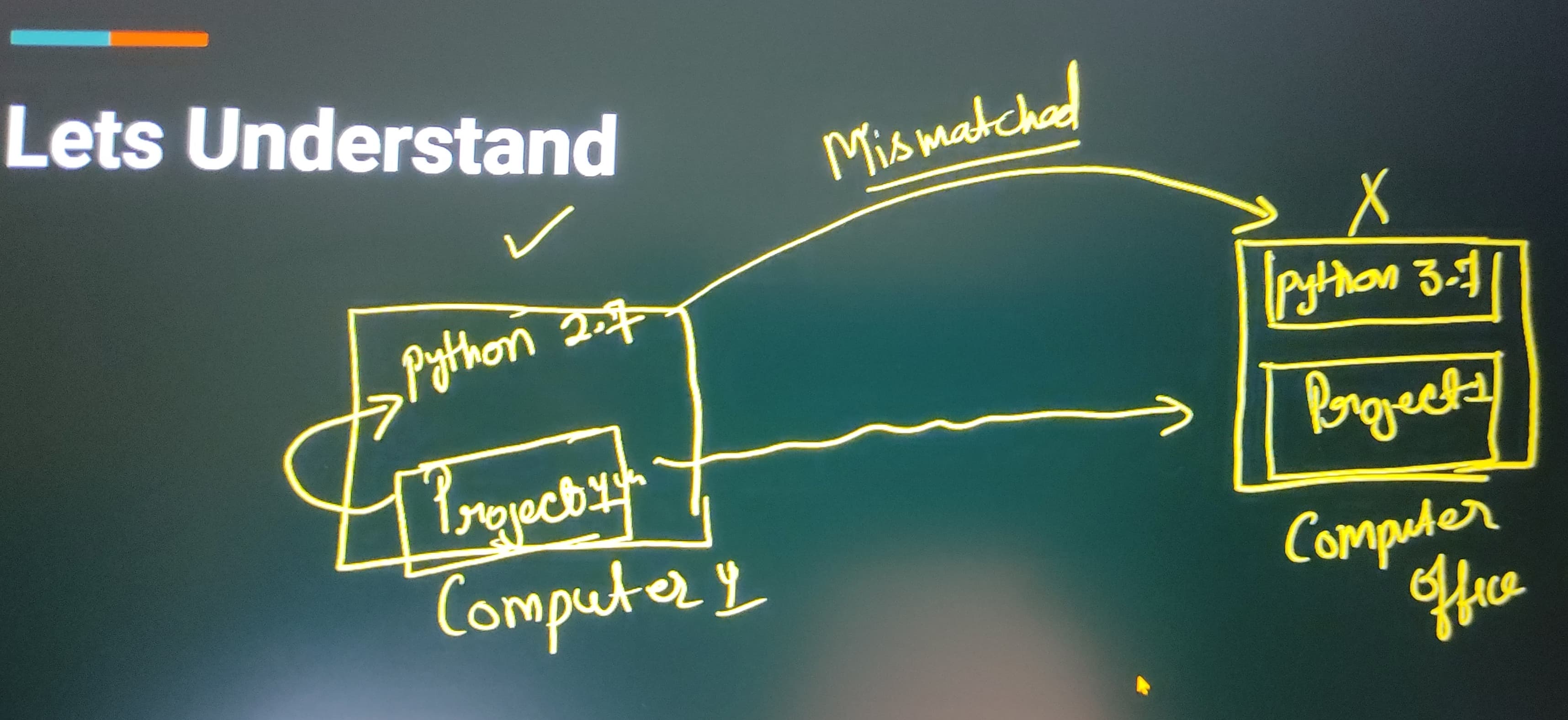
Docker is an open platform for developing, shipping and running applications.Docker is a platform which packages an application and all its dependencies together in the form of containers.
What problem does Docker solve?⌗
The main problem it solves is dependency management.
Docker Architecture⌗
Some Terms to Understand⌗
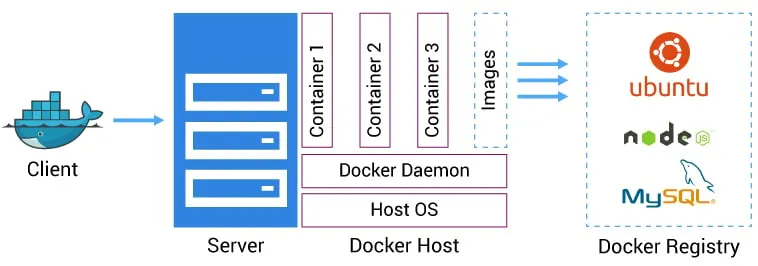
- Docker Daemon: Daemon is a program which runs on our computer and manages docker containers.
- Docker file: It is a text document which contains all the commands that a user can call on the command line to assemble an image.
- Images: Template to create docker container.
- Container: Running instance of docker image.Containers hold entire package to run application.
Basic Commands for Docker⌗
- Check the version
docker -v
- pull image
docker pull <image-name>
- check all the images
docker images
- search images
docker search <image-name>
- container creation
docker run <image-name>
- list all the running containers
docker ps
- list all the running + stopped containers
docker ps -a
- run container in background(detached mode) + change the name of container.
docker run --name <custom-name> -d <image-name/image-id>
- run container in -it {interactive-mode}, your container will run continuously
docker run --name <custom-name> -it -d <image-id/name>
- to execute the command inside your container
docker exec -it <container-id> command{python3/bash/java/cpp}
- get all the information about the container
docker inspect <container-id>
- stop the running container
docker stop <containerName>
- remove image
docker rm <image-name>
- to restart the running container
docker restart <container-id>
My-SQL Image Commands⌗
- get the image
docker install mysql
- run the mysql container
docker run --name <custome-mysql-name> -e MYSQL_ROOT_PASSWORD=<give-a-pass> -d mysql
- use commands inside mysql container
docker exec -it <custom-sql-name> <command-type>
Docker for Touchstone MCQ Test⌗
1. Docker Basics⌗
- What is Docker?
- Benefits of using Docker
- Docker vs Virtual Machines
- Docker Architecture
- Docker Engine
- Docker Daemon
- Docker Client
2. Docker Images⌗
- What is a Docker Image?
- Layers in Docker Images
- Docker Hub and Image Registries
- Pulling Images
docker pull - Listing Images
docker images - Removing Images
docker rmi - Custom Images using Dockerfile
(See Dockerfile section below)
3. Docker Containers⌗
- What is a Container?
- Creating Containers
docker run - Listing Containers
docker ps,docker ps -a - Starting/Stopping/Removing Containers
docker start,docker stop,docker rm - Inspecting Containers
docker inspect - Container Lifecycle
- Running containers in detached mode
-d - Executing commands inside containers
docker exec,docker attach - Logs and Terminal access
docker logs,docker exec -it
4. Dockerfile (Creating Custom Images)⌗
- What is a Dockerfile?
- Basic Dockerfile Instructions
FROMRUNCOPYADDCMDENTRYPOINTEXPOSEENVWORKDIR
- Building Image from Dockerfile
docker build - Best practices
- Minimizing layers
- Using
.dockerignore
5. Docker Volumes (Data Persistence)⌗
- What is a Volume?
- Types
- Volumes
- Bind Mounts
- Creating Volumes
docker volume create - Mounting Volumes to Containers
-vor--mount - Inspecting Volumes
docker volume inspect - Volume Persistence and Sharing between Containers
6. Docker Networking⌗
- Default Docker Networks
bridgehostnone
- Creating Custom Networks
docker network create - Connecting Containers to Networks
--network - Inspecting Networks
docker network inspect - Communication between containers
Via network name
7. Docker Compose (Multi-container Applications)⌗
- What is Docker Compose?
docker-compose.ymlfile structureversionservicesbuildportsvolumesdepends_onnetworks
- Running with Compose
docker-compose up,docker-compose down - Building and Rebuilding
docker-compose build,docker-compose up --build - Scaling services
docker-compose up --scale - Use cases and benefits
3 Ways To Create Docker Image⌗
Using spring-boot-maven-plugin to create docker image⌗
⚙️ Step 1: Build JAR⌗
mvn clean package
✅ Requirement⌗
spring-boot-maven-plugininpom.xml
👉 Output:
- Executable JAR →
target/*.jar
📦 Step 2: Dockerfile⌗
FROM eclipse-temurin:21-jdk-alpine
COPY target/*.jar app.jar
ENTRYPOINT ["java","-jar","/app.jar"]
🧠 Key Concepts⌗
FROM→ Base imageCOPY→ Add JAR into containerENTRYPOINT→ Run app
🏗️ Step 3: Build Image⌗
docker build -t myapp:v1 .
🔍 Breakdown⌗
-t→ tag (name:version).→ current directory (build context)
Read other posts