PL/SQL Full Notes
Table of Contents
What is PL/SQL?⌗
PL/SQL stands for Procedural Language Extension to SQL- It is a Extension of SQL developed by Oracle.
- It adds SQL capabilities of procedural programming like variables, loops and conditional statements in SQL.
PL/SQL Architecture⌗
Physical Architecture⌗
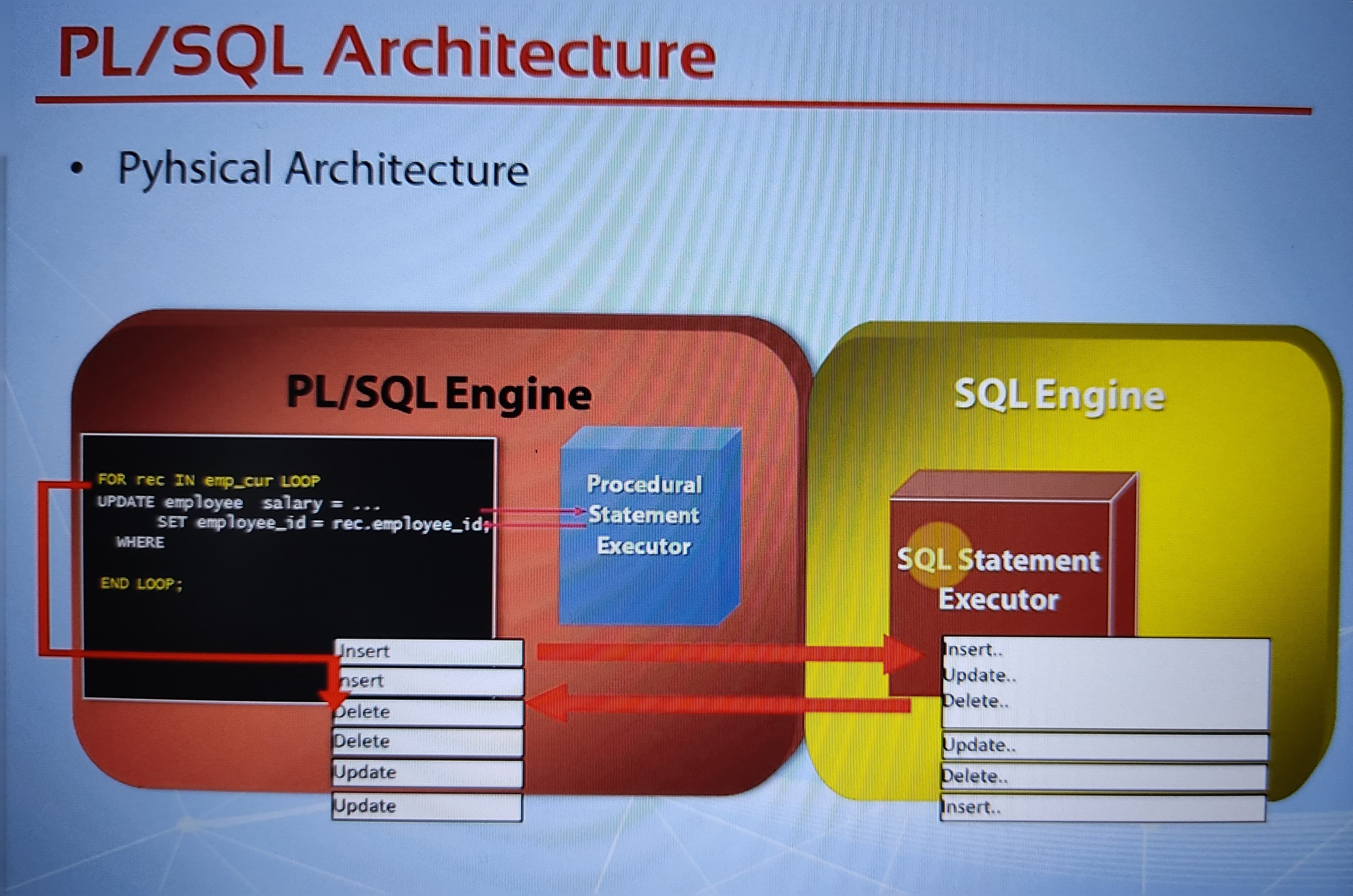
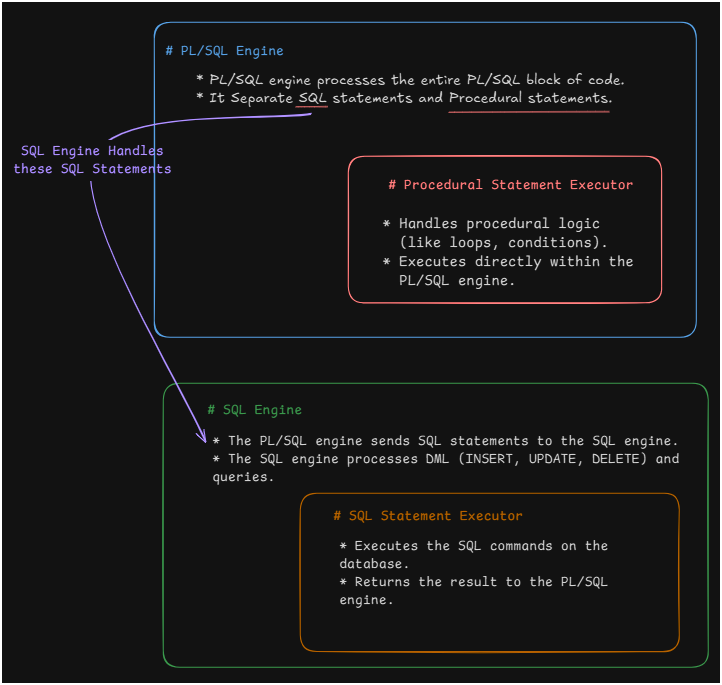
- PL/SQL engine processes the entire PL/SQL block of code.
- It Separate SQL statements and Procedural statements.
Simple Architecture Flow⌗
PL/SQL Logical Architecture⌗
- Corporates with SQL Engine.
- Enables Subprograms -> Allows re-usability of code/script like variables and functions.
- Dynamic Queries-> We can modify or create new Queries.
- Case Insensitivity
- Optimizer-> It optimizes our code for better performance.
- Enables Object-Oriented Programming
- Web Development
#Extras
Context Switching:
When you write SQL Query in PL/SQL the PL/SQL send the query to SQL Engine and the result will be returned this operation is called Context Switching.
Pluggable Database⌗
What is PDB?⌗
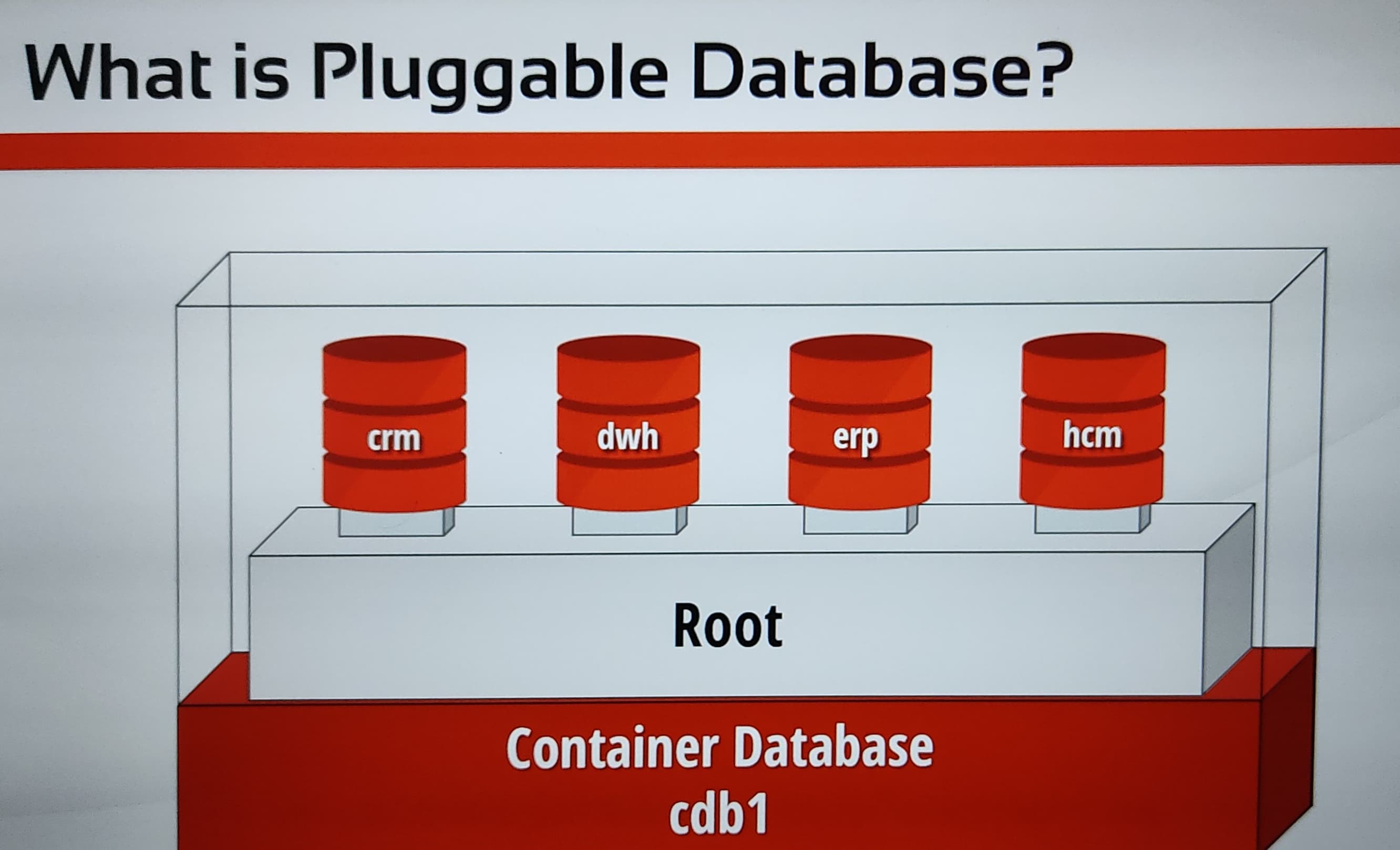
Pluggable Database (PDB) is a portable collection of schemas, tables, and objects that can be plugged into a Container Database (CDB) in Oracle.
Why PDB?⌗
- Better resource management
- Easier database consolidation
- Faster provisioning and cloning
Structure⌗
- A Container Database (CDB) holds multiple Pluggable Databases (PDBs).
- A PDB is independent and can be moved or cloned between CDBs.
- Each PDB has its own:
- Data files
- Schemas
- Tables
- Users
- A single CDB can manage multiple PDBs, improving scalability and consolidation.
What are Blocks?⌗
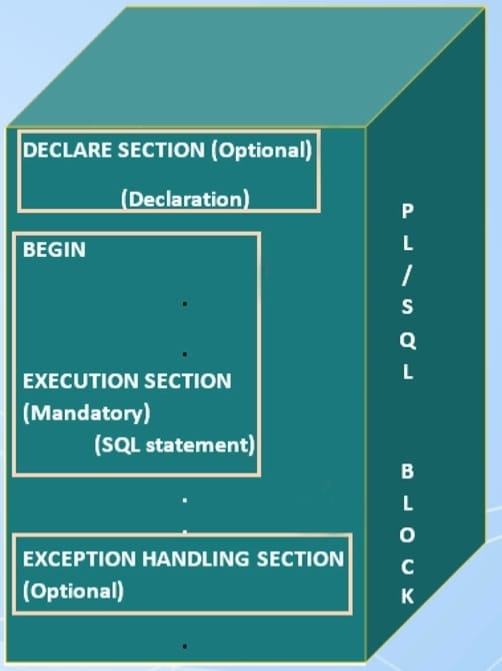
Block is a logical unit of code that groups related declarations, statements.
Structure⌗
- DECLARE Block.
Here we declare Variables, const, exceptions.
- EXECUTION BLOCK.
Contains Executable Statements like SQL, procedural statements. Starts with BEGIN
- EXCEPTION HANDLING BLOCK.
Starts with EXCEPTION Handles exceptions and errors during execution.
Syntax of PL/SQL Block⌗
DECLARE
   -- Declaration statements (optional)
BEGIN
   -- Executable statements (mandatory)
EXCEPTION
   -- Exception handling statements (optional)
END;
Types of Blocks⌗
- Anonymous Block
- Procedures
- Functions
Coding in PL/SQL⌗
How to Print Text as Output in PL/SQL⌗
SET SERVEROUTPUT ON;
begin
dbms_output.put_line('Hello World');
end;
Nested Blocks⌗
*We can add begin end inside begin end block that way we can do nested blocks.
SET SERVEROUTPUT ON;
begin
dbms_output.put_line('Hello World');
    BEGIN
        dbms_output.put_line('Its Me Rawat');
    END;
end;
Variables⌗
`Same Use Cases as in normal Programming language.'
PL/SQL Variable Types⌗
- SCALAR Holds single value of same type.
- REFERENCE Pointers.
- LARGE OBJECTS Holds pointers of large data.
- COMPOSITE Hold more then one data type.
SCALAR DATA TYPES⌗
- CHAR()
- VARCHAR()
- NUMBER[,]
- BINARY_INTEGER = PLSINTEGER
- BINARY_FLOAT
- BINARY_DOUBLE
- BOOLEAN
- DATE
- TIMESTAMP
- TIMESTAMP(P) WITH TIME ZONE
- TIMESTAMP(P) WITH LOCAL TIME ZONE
- INTERVAL(P) YEAR TO MONTH
- INTERVAL(P) DAY TO SECOND(P)
Variable Naming Conventions⌗
- Must Start with letter.
- Can contain some special character.(like _ ,#,$)
- Can be maximum 30 char
- can not have oracle reserved words.
Operations in PL-SQL⌗
Setting default variables⌗
SET SERVEROUTPUT ON;
DECLARE
    V_TEXT STRING(50) NOT NULL DEFAULT 'ITS_RAWAT';
BEGIN
DBMS_OUTPUT.PUT_LINE(V_TEXT);
END;
Assigning variables⌗
SET SERVEROUTPUT ON;
DECLARE
    V_TEXT STRING(50) NOT NULL DEFAULT 'ITS_RAWAT';
BEGIN
    V_TEXT:= 'PL/SQL';
    DBMS_OUTPUT.PUT_LINE(V_TEXT);
END;
Concatenation of Strings⌗
SET SERVEROUTPUT ON;
DECLARE
    V_TEXT STRING(50) NOT NULL DEFAULT 'ITS_RAWAT';
BEGIN
    V_TEXT:= 'PL/SQL' || ' IS DIFFERENT';
    DBMS_OUTPUT.PUT_LINE(V_TEXT || ' BUT MANAGEABLE');
END;
OR
SET SERVEROUTPUT ON;
DECLARE
    V_TEXT STRING(50) NOT NULL := 'WELCOME';
BEGIN
    DBMS_OUTPUT.PUT_LINE(V_TEXT || ' ITS_RAWAT');
END;
🟢 Level 1 — Easy⌗
Focus: SELECT, WHERE, ORDER BY, LIMIT, basic functions.
-
Display all columns from the
productstable. -
Display only
productName,productLine, andbuyPricefromproducts. -
Find all products whose
productLineis Classic Cars. -
Find all products where
buyPriceis greater than 50. -
Display all customers from USA.
-
Find all employees whose
jobTitleis Sales Rep. -
Display products sorted by
buyPricefrom lowest to highest. -
Display the 10 most expensive products based on
buyPrice. -
Find products where
quantityInStockis less than 1000. -
Display customers whose
creditLimitis greater than 100000.
🟡 Level 2 — Medium⌗
Focus: AND, OR, LIKE, IN, BETWEEN, aggregate functions, GROUP BY.
-
Find products whose
buyPriceis between 50 and 100. -
Find customers who are from USA, France, or Germany.
-
Find products whose name contains the word Ford.
-
Find products where
buyPrice > 50andquantityInStock > 5000. -
Find the minimum, maximum, and average
buyPriceof all products. -
Find the total number of products in the
productstable. -
Find the number of customers in each country.
-
Find the average credit limit for each country.
-
Find the number of products in each
productLine. -
Find product lines having more than 10 products.
🟠 Level 3 — Hard⌗
Focus: JOIN, GROUP BY, HAVING, subqueries.
-
Display each product along with its product line name.
-
Display each customer along with the first name and last name of their sales representative.
-
Display each employee along with their office city and country.
-
Display each order along with the customer’s name.
-
Find the total number of orders for each customer.
-
Find the total payment amount for each customer.
-
Find the total quantity ordered for each product.
-
Find the total sales amount for each order.
Hint:
quantityOrdered × priceEach
-
Find customers who have placed more than 5 orders.
-
Find products whose
buyPriceis greater than the average buy price of all products.
🔴 Level 4 — Very Hard⌗
Now start thinking like a SQL developer / data analyst. 💪
-
Find the top 10 customers by total payment amount.
-
Find the top 10 products by total sales revenue.
-
Find the total revenue generated by each product line.
-
Find the total revenue generated by each customer using
orders+orderdetails. -
Find the sales representative who is responsible for the highest number of customers.
-
Find the sales representative who generated the highest total sales revenue.
-
Find customers who have never placed an order.
-
Find customers who have never made a payment.
-
Find products that have never been ordered.
-
Find the customer who has the highest total order value.
🔥 Level 5 — Advanced SQL⌗
These are closer to interview-level questions.
-
Find the second-highest buy price among all products.
-
Find the third-highest buy price without using
LIMIT. -
Find the most expensive product in each product line.
-
Find the cheapest product in each product line.
-
Find the customer with the highest credit limit in each country.
-
Find the employee who has the most customers assigned to them.
-
Find each customer’s:
- customer name
- total orders
- total payments
- total order value
-
Find customers whose total payments are greater than their total order value.
-
Find orders where the total order value is greater than the average order value of all orders.
-
Find the best-selling product in each product line based on total quantity ordered.